 xunaawen@outlook.com
  WhatsApp:+86 13698446041
 Custom Certificates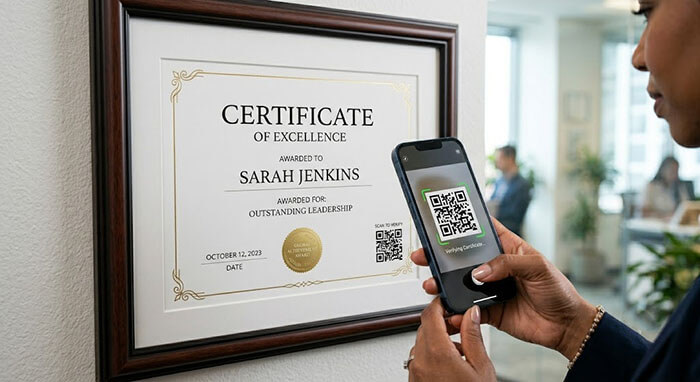
Paper has been our primary tool for recording achievements for thousands of years. It feels permanent, handles beautifully, and holds immense emotional weight. However, we live in a hybrid world. Today, almost every physical asset we own has a digital twin stored safely on a cloud network.
Historically, physical paper and digital files lived in separate universes. If someone looked at a physical certificate or portfolio page on a wall, they had no easy way to check the deeper digital story behind it.
That is changing rapidly. By integrating clean, minimal QR code elements directly into modern document design, you can build a flawless bridge between tactile print quality and instantaneous online validation. Here is how this smart technology integration enhances modern document functions.
1. Linking Physical Awards to Digital Portfolios
If you are a creative professional—such as an architect, a graphic designer, or a software engineer—displaying a milestone award is great, but showing the actual work is even better.
By cleanly positioning an elegant vector QR code in a corner margin, anyone standing in your office can point their smartphone camera at the frame and instantly load your live interactive website, a video recap of your successful project launch, or a cloud drive containing your full career history.
2. Seamless Document Verification for Training Seminars
For corporate training managers, boutique education groups, and local athletic clubs, issuing completion certificates is a vital ritual. But managing validation manually can drain hours of administrative time.
[ Physical Certificate Sheets ] ---> Smart Vector QR Code Printed in Corner
                                                  |
                         +------------------------+------------------------+
                         |                                                 |
             [ Scan via Smartphone Camera ]                   [ Instantly Loads Server ]
             (No Manual Typos)                                (Confirms Attendance Status)
Adding a stylized barcode allows future clients or internal HR staff to scan the physical sheet and verify attendance legitimacy instantly on your company server, eliminating manual search steps entirely.
3. Adding Multimedia Layers to Keepsake Gifts
Planning a unique anniversary milestone print or a family tree layout for a retirement celebration? A custom QR code can turn a static wall display into an emotional multimedia experience. You can link the code directly to a hidden family video compilation, a shared digital photo album, or a curated music playlist from their wedding year, breathing interactive life into a beautiful paper keepsake.
Crafting the Future of Print Media
At DocuReplicas, we don’t believe that technology replaces paper—we believe it can make it smarter. Our design team can seamlessly incorporate crisp, high-resolution vector codes into any of our custom layout options without sacrificing clean aesthetic borders. Bring your documents into the modern era with absolute precision.
👉 Make Your Print Smart. Explore Modern Layout Options at DocuReplicas!
🔗 How to Link These New Posts (Internal Linking Network):
-
Link Day 13 Post 2 to Day 13 Post 1: Inside Day 13 Post 2 (Psychological Edge), under section 2 (Behavioral Priming), hyperlink the words
"foil stamping"directly back to Day 13: Post 1 (The Power of Metallic Security Accents) so users can review how hot foil presses work. -
Link Day 14 Post 1 to Day 6 Post 2: Inside Day 14 Post 1 (Framing Guide), in the final section, look for the embedded text link prompt and connect the phrase
"collector's preservation guide"straight to Day 6: Post 2 (Collector’s Preservation Guide). -
Link Day 14 Post 2 to Day 11 Post 2: Inside Day 14 Post 2 (QR Codes), in the section discussing code placement, link the phrase
"clean aesthetic borders"or"document design"directly to Day 11: Post 2 (Mastering Alignment & Grids) to remind users how geometric grids accommodate modern design elements beautifully.